Adds a download button (for one-click HD downloads) and an "Open in New Tab" button to each video on the RedGIFs site.
This script enhances your RedGIFs experience by adding two convenient buttons to each video:
It also now includes a powerful Annoyance & Ad Remover to clean up the UI.
Please note: This script does not work on videos embedded on external sites, only on RedGIFs itself.
There are no plans to add support for embedded videos.
{tags} placeholder to the filename template settings. You can now automatically include video tags (e.g., #tag1_#tag2) in your downloaded files. Generated filenames are also now safely limited to 150 characters to prevent OS-level saving errors.Access the settings via your userscript manager's menu:
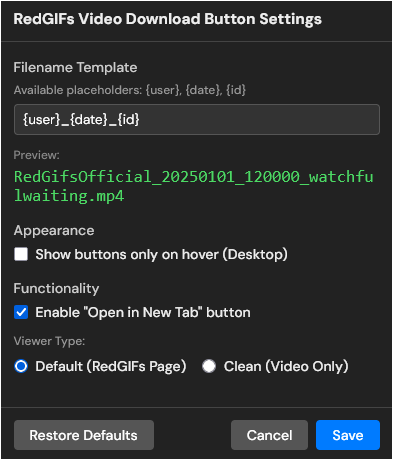
{user}, {date}, {id}, {tags}This script now also cleans the RedGIFs interface by removing visual clutter and ads. This feature is enabled by default and hides the following elements:
A Note on This Feature:
Please consider the Annoyance & Ad Removal a "best-effort" bonus feature. The script's core purpose remains the
DownloadandOpen in New Tabbuttons.This feature is tuned for the current RedGIFs site layout (as of 2025/11/06), and future site updates will likely break parts of the removal logic. While I will try to keep it functional, please understand that ongoing maintenance for this specific feature is not guaranteed, as it is secondary to the script's main functionality.
This script modifies the global
JSON.parsefunction and may conflict with other userscripts that modify the same function.If you experience page errors or downloads failing, please temporarily disable all other userscripts active on RedGIFs to determine if the cause is a script conflict or a recent site update.
This script's architecture has evolved to maintain reliability against site updates.
Unlike older versions (v1.2) that made their own API requests, this script now intercepts the site's own data flow to build a cache of HD links in advance. This makes downloads instant and highly efficient.
Here is a brief comparison of the methods used over time:
| Script Version | Method | How It Works | Pros (✅) | Cons (❌) | Resilience |
|---|---|---|---|---|---|
| v2.3+ | Full Context Interception ( unsafeWindow + Response.json) |
Intercepts both JSON.parse and Response.prototype.json directly in the page context (via unsafeWindow). |
✅ Most Robust: Captures data even if the site bypasses global JSON.parse or uses modern fetch methods.✅ Reliable: Bypasses sandbox limitations to access the true execution context. |
❌ Complex: Requires deeper integration with the browser environment. |
Maximum |
| v1.5 - v2.2 | JSON.parse Interception |
Intercepted the global JSON.parse function to inspect parsed data. |
✅ Resilient: Worked well as long as the site used standard JSON parsing. |
❌ Limited: Could be bypassed if the site used fetch().json() native implementation directly. |
High |
| v1.3 - v1.4 | XHR/Fetch Interception |
Intercepted network requests to api.redgifs.com. |
✅ Fast: Cached data on load. |
❌ Fragile: Broke if API endpoints changed. |
Medium |
| v1.2 & Older | On-Demand API Request | Fetched data only when "Download" was clicked. | ✅ Simple Logic | ❌ Very Fragile & Slow: Broke constantly; required extra requests. |
Lowest |
This script is open-source and licensed under the MIT License.

