EroTok Mini

Requires the local EroTok GUI/API from GitHub. Adds an EroTok Mini panel for public Erome search, preview, and downloads.

You will need to install an extension such as Tampermonkey, Greasemonkey or Violentmonkey to install this script.

You will need to install an extension such as Tampermonkey to install this script.

You will need to install an extension such as Tampermonkey or Violentmonkey to install this script.

You will need to install an extension such as Tampermonkey or Userscripts to install this script.

You will need to install an extension such as Tampermonkey to install this script.

You will need to install a user script manager extension to install this script.

(I already have a user script manager, let me install it!)

You will need to install an extension such as Stylus to install this style.

You will need to install an extension such as Stylus to install this style.

You will need to install an extension such as Stylus to install this style.

You will need to install a user style manager extension to install this style.

You will need to install a user style manager extension to install this style.

You will need to install a user style manager extension to install this style.

(I already have a user style manager, let me install it!)

Skaber
Chad Jordan
Daglige installationer
0
Installationer i alt
12
Bedømmelser
0 0 0
Version
0.1.2
Oprettet
16.05.2026
Opdateret
16.05.2026
Size
20,9 kB
Licens
BSD-2-Clause
Gælder for

EroTok Mini - SleazyFork Listing README

Use this page as the long description / additional info for the EroTok Mini userscript on SleazyFork.

Listing Title

EroTok Mini - local GUI/API companion for public Erome pages

Short Description

Adds a floating EroTok Mini panel to public Erome pages. Requires the local EroTok GUI/API from GitHub for search, preview, and downloads.

Required GitHub Install

EroTok Mini is not a standalone downloader. The userscript is a browser panel that talks to the local EroTok GUI/API server running on your computer.

You must install and start the GitHub project first:

https://github.com/insomniakin/EromeAPI-main

The local server is required because browser userscripts cannot reliably save files, run the Python scraper/API layer, manage download jobs, or show full download progress by themselves.
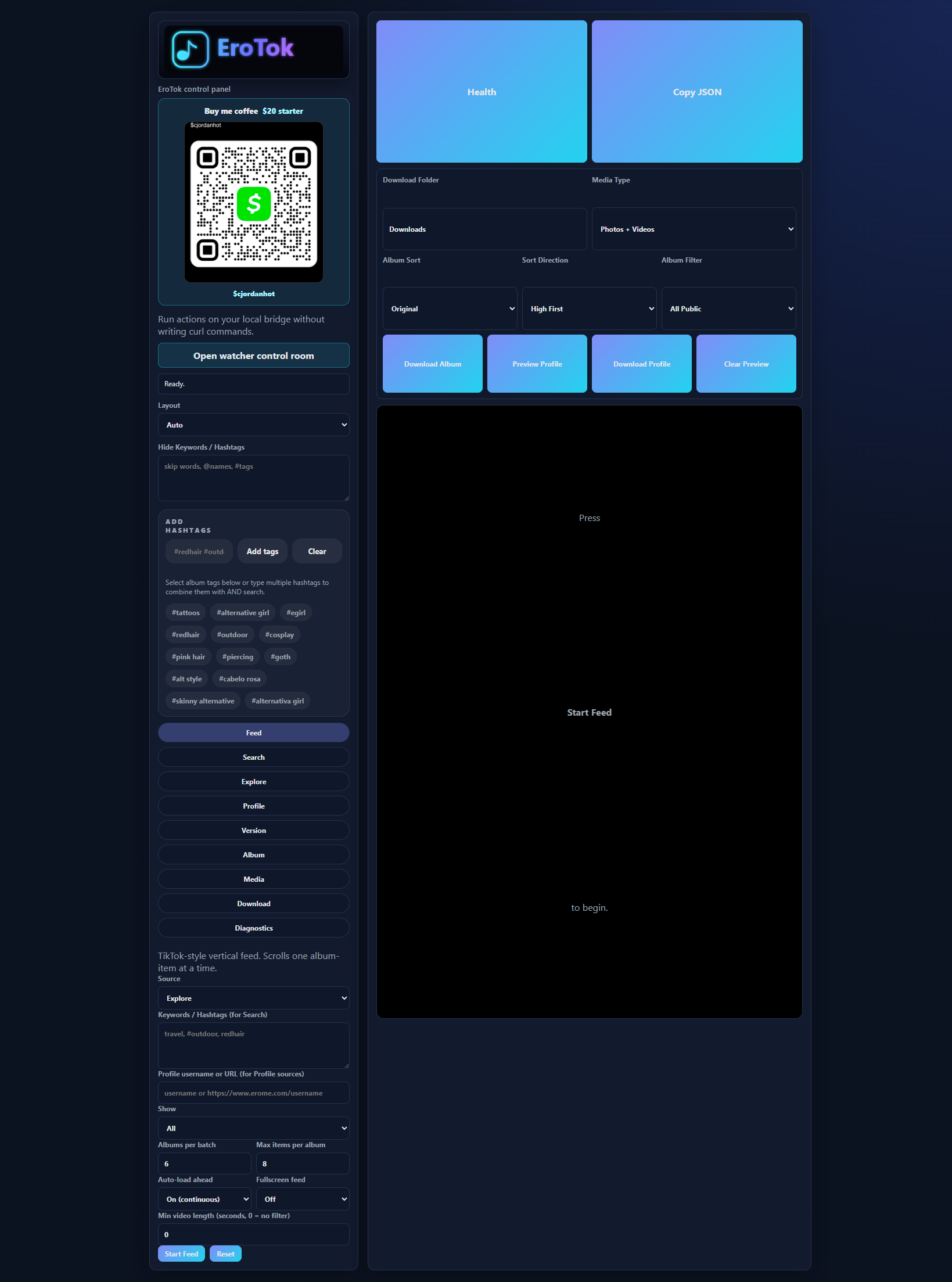

Screenshots

Full EroTok GUI

EroTok control panel

QR support card and hashtag controls

EroTok support QR and hashtag controls

Support QR

Cash App QR code for $cjordanhot

What The Userscript Adds

EroTok Mini injects a compact lower-right panel on public https://www.erome.com/* pages.

Features:

  • Search public albums through your local EroTok server
  • Load Explore results from the local API
  • Load the current public profile when you are on a profile page
  • Download the current public album page through local download jobs
  • Use multi-word hashtag chips such as #alternative girl
  • Combine typed keywords and selected hashtags
  • Hide results matching usernames, words, or hashtags
  • Save mini-panel settings with userscript storage
  • Open the full local GUI at http://127.0.0.1:3000/
  • Link back to the GitHub project when users want the full version

Install The Required Local GUI/API

Install Python 3.10+ and Node.js first. Then install EroTok from GitHub.

git clone https://github.com/insomniakin/EromeAPI-main.git
cd EromeAPI-main
pip install -r requirements.txt
node server.js

Open the full GUI:

http://127.0.0.1:3000/

If you downloaded a ZIP instead of cloning with Git, open a terminal in the folder that contains server.js, then run:

pip install -r requirements.txt
node server.js

The userscript expects the API server to be available at:

http://127.0.0.1:3000

Install The Userscript

  1. Install Tampermonkey, Violentmonkey, or another compatible userscript manager.
  2. Install the userscript from SleazyFork.
  3. Keep the local EroTok server running with node server.js.
  4. Open a public Erome page.
  5. Use the EroTok Mini panel in the lower-right corner.

GitHub source file:

https://github.com/insomniakin/EromeAPI-main/blob/main/userscript/erotok.user.js

Raw install source:

https://raw.githubusercontent.com/insomniakin/EromeAPI-main/main/userscript/erotok.user.js

Basic Use

  1. Start the local GUI/API with node server.js.
  2. Visit a public Erome page.
  3. Confirm the userscript panel says the local server is ready.
  4. Add keywords, hashtags, or hide terms.
  5. Click Search, Explore, or Profile.
  6. On a public album page, click Download Page.
  7. Open the full local app for live progress and advanced controls.

Why The Local Server Is Required

The userscript handles the browser-side convenience layer. The local EroTok GUI/API handles the heavy work:

  • Public-page scraping through the Python API
  • Search enrichment and hashtag filtering
  • Media URL proxying for preview reliability
  • Download queues and progress tracking
  • Skip/overwrite behavior
  • Local state and settings
  • Watcher routes and optional dashboard

Without the local server, the userscript can show the panel, but search and downloads will not work.

Responsible Use

Use EroTok only for public content that you own, created, or have permission to archive. Do not use it to bypass access controls, scrape private/restricted content, rehost other people's media, evade platform rules, or download content where you do not have rights.

This tool does not log in to Erome, bypass private pages, upload files, edit posts, comment, or generate fake engagement.

Support

The full local GUI includes a QR-first support card for $cjordanhot. Scan the QR image from the app or from this README if you want to buy me coffee with the $20 starter support option.

Project Links