RedGIFs Video Download Button

Adds a download button (for one-click HD downloads) and an "Open in New Tab" button to each video on the RedGIFs site.

Dovrai installare un'estensione come Tampermonkey, Greasemonkey o Violentmonkey per installare questo script.

You will need to install an extension such as Tampermonkey to install this script.

Dovrai installare un'estensione come Tampermonkey o Violentmonkey per installare questo script.

Dovrai installare un'estensione come Tampermonkey o Userscripts per installare questo script.

Dovrai installare un'estensione come ad esempio Tampermonkey per installare questo script.

Dovrai installare un gestore di script utente per installare questo script.

(Ho già un gestore di script utente, lasciamelo installare!)

Dovrai installare un'estensione come ad esempio Stylus per installare questo stile.

Dovrai installare un'estensione come ad esempio Stylus per installare questo stile.

Dovrai installare un'estensione come ad esempio Stylus per installare questo stile.

Dovrai installare un'estensione per la gestione degli stili utente per installare questo stile.

Dovrai installare un'estensione per la gestione degli stili utente per installare questo stile.

Dovrai installare un'estensione per la gestione degli stili utente per installare questo stile.

(Ho già un gestore di stile utente, lasciamelo installare!)

Autore
p65536
Installazioni giornaliere
14
Installazioni totali
493
Valutazione
6 0 0
Versione
2.1.0
Creato il
11/08/2025
Aggiornato il
21/12/2025
Dimensione
99,7 KB
Licenza
MIT
Applica a

Overview

This script enhances your RedGIFs experience by adding two convenient buttons to each video:

  1. A download button for one-click downloads of the HD version.
  2. An "Open in New Tab" button to quickly view the video on its own page.

It also now includes a powerful Annoyance & Ad Remover to clean up the UI.

Please note: This script does not work on videos embedded on external sites, only on RedGIFs itself.
There are no plans to add support for embedded videos.


Features

  • One-Click HD Download: Automatically fetches the HD video source and downloads it directly.
  • Open in New Tab: Works as a standard link, supporting Middle-Click and Ctrl+Click to open videos in a background tab without losing focus.
  • Seamless UI Integration: The buttons are added to the corner of each video, looking like a native feature.
  • Dynamic Content Support: Works reliably on pages with infinite scrolling by automatically detecting newly loaded videos.
  • Visual Feedback: The download button's icon changes to show its status (in progress, success, error), and a toast notification provides clear feedback.

Configuration (Settings Menu)

Access the settings via your userscript manager's menu:
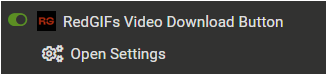
  1. Open the Tampermonkey (or equivalent) menu in your browser.
  2. Select RedGIFs Video Download Button Settings.
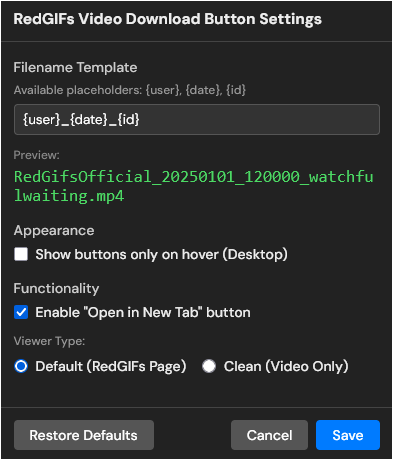
  3. Configure your preferences in the modal window.

Settings Menu

Settings Panel

Available Options (Click to Expand)
  1. Filename Template
    • Customize the naming format for downloaded files.
    • Placeholders: {user}, {date}, {id}
    • Includes a real-time preview to ensure your format is correct.

  2. Appearance: Show buttons only on hover
    • If enabled, buttons are hidden by default and only appear when you hover your mouse over a video or thumbnail.
    • Note: On mobile devices, buttons remain always visible to ensure usability.

  3. Functionality: Enable "Open in New Tab" button
    • Toggle this OFF if you prefer a cleaner look with only the Download button.

Annoyance & Ad Removal

This script now also cleans the RedGIFs interface by removing visual clutter and ads. This feature is enabled by default and hides the following elements:

  • Top information/ad banner
  • In-feed video ads (on both mobile and desktop)
  • In-feed "Trending Niches" and "Trending Creators" panels
  • Desktop ad sidebar (hidden without breaking the page layout)
  • The external site buttons in the site header (Cams and Live)
  • "LIVE" ad buttons on video sidebars

A Note on This Feature:

Please consider the Annoyance & Ad Removal a "best-effort" bonus feature. The script's core purpose remains the Download and Open in New Tab buttons.

This feature is tuned for the current RedGIFs site layout (as of 2025/11/06), and future site updates will likely break parts of the removal logic. While I will try to keep it functional, please understand that ongoing maintenance for this specific feature is not guaranteed, as it is secondary to the script's main functionality.


Tested Environment

  • This script is primarily developed and tested on Firefox with Tampermonkey.
  • It is also confirmed to work on Chromium-based browsers, but testing on these platforms is less extensive.
  • The script is primarily designed for desktop browsers.
  • While basic functionality is checked using the browser's devtools (mobile emulator), it is not tested on actual mobile devices. You may encounter bugs or UI issues on mobile.

Potential Conflict Warning (Click to Expand)

This script modifies the global JSON.parse function and may conflict with other userscripts that modify the same function.

If you experience page errors or downloads failing, please temporarily disable all other userscripts active on RedGIFs to determine if the cause is a script conflict or a recent site update.


How This Script Works (Evolution of Data Fetching) (Click to Expand)

This script's architecture was fundamentally changed in v1.3 and again in v1.5 to improve speed and resilience.

Unlike older versions (v1.2), this script no longer makes its own API requests (for guest tokens, etc.) when you click a download button.
Instead, it now intercepts the site's own data to build a cache of HD links in advance. This makes downloads instant and highly efficient.

Here is a brief comparison of the methods used over time:

Script Version Method How It Works Pros (✅) Cons (❌) Resilience to Site Changes
v1.5+ JSON.parse Interception Intercepts the JSON.parse function itself. It inspects all parsed JSON data on the site to find video information. Extremely Resilient:
Works even if the site changes its data-fetching method (e.g., to gRPC, WebSocket).
Very Fast:
Data is cached instantly as the site uses it.
Very Broad:
Intercepts all JSON parsing, requiring careful filtering.
(This script uses efficient key-checking and early returns to mitigate performance impact.)
Highest:
As long as the site uses JSON to get video data, this will work.
v1.3 - v1.4 XHR/Fetch Interception Intercepted the site's network requests (fetch/XHR) to api.redgifs.com to "read" the response data. Resilient:
Doesn't depend on API tokens.
Fast:
Data is cached as the page loads.
Fragile:
Breaks if the site stops using fetch/XHR or changes its API endpoint structure.
Medium:
Vulnerable to network-level changes.
v1.2 & Older On-Demand API Request When you clicked "Download," the script would:
1. Fetch a Guest Token.
2. Use the token to fetch Video Info.
3. Initiate the download.
Simple:
Easy to understand logic.
Very Fragile:
Broke constantly due to site changes in the authentication/API process.
Slow:
Required 2+ network requests per download.
Lowest:
This method was abandoned due to its high maintenance burden.

This script is open-source and licensed under the MIT License.