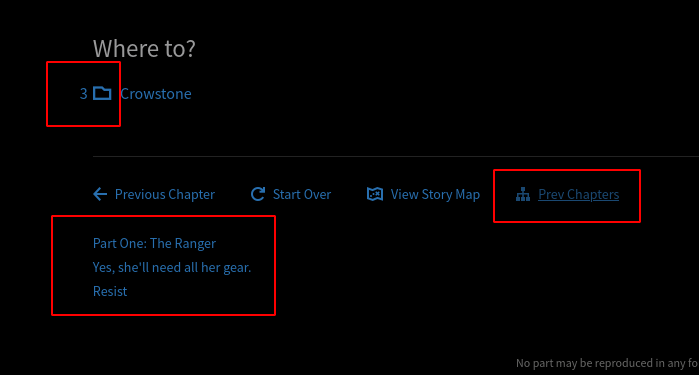
Chapter counter for Map and Next Chapter choice

Counts and displays how many chapters each branch has inside on the map screen and when choosing your next chapter

Aby zainstalować ten skrypt, wymagana jest instalacje jednego z następujących rozszerzeń: Tampermonkey, Greasemonkey lub Violentmonkey.

Aby zainstalować ten skrypt, wymagana jest instalacje jednego z następujących rozszerzeń: Tampermonkey, Violentmonkey.

Aby zainstalować ten skrypt, wymagana jest instalacje jednego z następujących rozszerzeń: Tampermonkey, Violentmonkey.

Aby zainstalować ten skrypt, wymagana będzie instalacja rozszerzenia Tampermonkey lub Userscripts.

You will need to install an extension such as Tampermonkey to install this script.

Aby zainstalować ten skrypt, musisz zainstalować rozszerzenie menedżera skryptów użytkownika.

(Mam już menedżera skryptów użytkownika, pozwól mi to zainstalować!)

You will need to install an extension such as Stylus to install this style.

You will need to install an extension such as Stylus to install this style.

You will need to install an extension such as Stylus to install this style.

Będziesz musiał zainstalować rozszerzenie menedżera stylów użytkownika, aby zainstalować ten styl.

Będziesz musiał zainstalować rozszerzenie menedżera stylów użytkownika, aby zainstalować ten styl.

Musisz zainstalować rozszerzenie menedżera stylów użytkownika, aby zainstalować ten styl.

(Mam już menedżera stylów użytkownika, pozwól mi to zainstalować!)

Autor
sllypper
Dziennych instalacji
0
Wszystkich instalacji
75
Oceny
0 0 0
Wersja
3.0.2
Utworzono
20-04-2021
Zaktualizowano
16-01-2024
Rozmiar
34,5 KB
Licencja
Brak licencji
Dotyczy

Map page

  • Shows how many chapters are inside each chapter in the map screen
  • Button to toggle Collapse/Expand of all chapters of the chosen depth

Chapter page

  • Shows the date of chapters of scanned stories under the chapter's header
  • Shows how many chapters are inside each chapter choice
  • Button "Prev Chapters" that shows a tree of all chapters leading to the present one

How to use:

Open the map page, load the entire map moving to the bottom, then click regenerate. Now it should all work

Ver 3.0.0 alpha. Didn't polish, code is wack, but its usable