Imaglr - Widescreen Improvements

Makes the main post container on Imaglr full width, optionally displaying multiple posts per row. Adjust post size and Home page display style.

Aby zainstalować ten skrypt, wymagana jest instalacje jednego z następujących rozszerzeń: Tampermonkey, Greasemonkey lub Violentmonkey.

You will need to install an extension such as Tampermonkey to install this script.

Aby zainstalować ten skrypt, wymagana jest instalacje jednego z następujących rozszerzeń: Tampermonkey, Violentmonkey.

Aby zainstalować ten skrypt, wymagana będzie instalacja rozszerzenia Tampermonkey lub Userscripts.

You will need to install an extension such as Tampermonkey to install this script.

Aby zainstalować ten skrypt, musisz zainstalować rozszerzenie menedżera skryptów użytkownika.

(Mam już menedżera skryptów użytkownika, pozwól mi to zainstalować!)

Advertisement:

You will need to install an extension such as Stylus to install this style.

You will need to install an extension such as Stylus to install this style.

You will need to install an extension such as Stylus to install this style.

Będziesz musiał zainstalować rozszerzenie menedżera stylów użytkownika, aby zainstalować ten styl.

Będziesz musiał zainstalować rozszerzenie menedżera stylów użytkownika, aby zainstalować ten styl.

Musisz zainstalować rozszerzenie menedżera stylów użytkownika, aby zainstalować ten styl.

(Mam już menedżera stylów użytkownika, pozwól mi to zainstalować!)
Advertisement:

Autor
Hentiedup
Dziennych instalacji
0
Wszystkich instalacji
5
Oceny
0 0 0
Wersja
2.0.3
Utworzono
17-04-2026
Zaktualizowano
02-06-2026
Rozmiar
3,02 KB
Licencja
Unlicense
Dotyczy

Imaglr - Widescreen Improvements

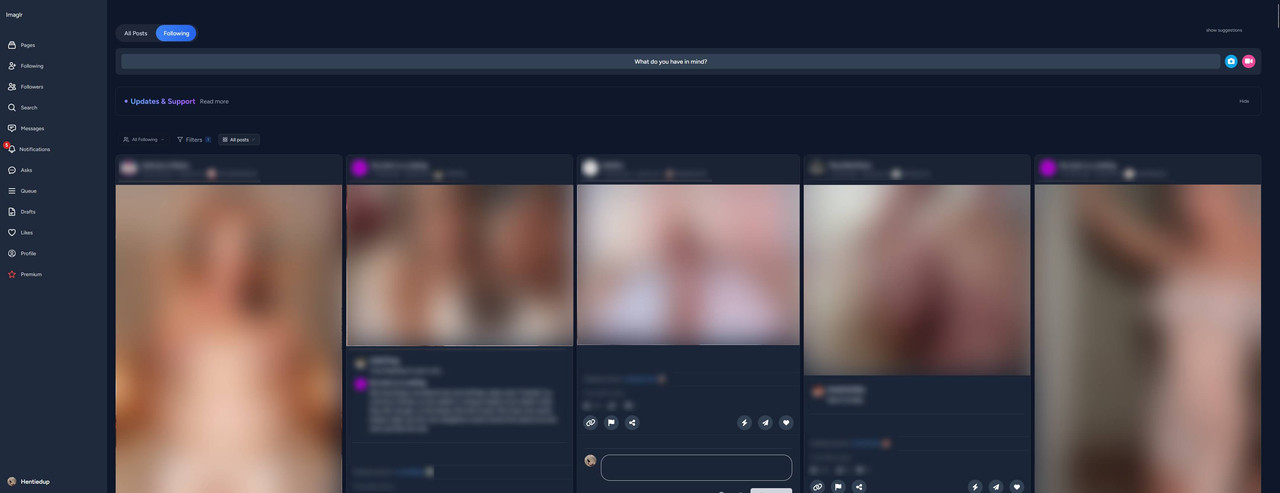
Makes the main post container on Imaglr full width, optionally displaying multiple posts per row. Also lets you adjust post size and home page display style. (Affects Home page and Profile pages)

Screenshot ^Example screenshot on an ultrawide monitor^

Also makes it so the little "Suggestions" box on the side, does not take up screen space when hidden. You can hide it from the small "hide" button on it, and show it again by clicking on "show suggestion" at the top of the page on the right. (see screenshot)


You need Stylus to be able to install userstyles.


Settings

Settings found in Stylus menu by clicking the cog icon next to the style.

  • Post Container Width: Sets the width of the main container that houses all the posts.
  • Single Post Width: Sets the desired post width.
    • Note that in Grid and Masonry view modes, posts will be enlarged to fill the remaining available space up to until there is enough space to fit a new post at desired width.
    • e.g. If there is 1200px of space, and you have Single Post Width set to 500px, it can't fit 3 in a row, so instead it will expand the 2 it can fit.
  • Home Page Mode: Lets you choose the view mode for the home page.