Imaglr - Widescreen Improvements

Makes the main post container on Imaglr full width, optionally displaying multiple posts per row. Adjust post size and Home page display style.

Terá de instalar uma extensão como Tampermonkey, Greasemonkey ou Violentmonkey para instalar este script.

You will need to install an extension such as Tampermonkey or Violentmonkey to install this script.

Terá de instalar uma extensão como Tampermonkey ou Violentmonkey para instalar este script.

Terá de instalar uma extensão como Tampermonkey ou Userscripts para instalar este script.

Terá de instalar uma extensão como Tampermonkey para instalar este script.

Terá de instalar uma extensão de gestão de scripts de utilizador para instalar este script.

(Já tenho um gestor de scripts de utilizador, deixe-me instalá-lo!)

Terá de instalar uma extensão como Stylus para instalar este estilo.

Terá de instalar uma extensão como Stylus para instalar este estilo.

Terá de instalar uma extensão como Stylus para instalar este estilo.

Terá de instalar uma extensão de gestão de estilos de utilizador para instalar este estilo.

Terá de instalar uma extensão de gestão de estilos de utilizador para instalar este estilo.

Terá de instalar uma extensão de gestão de estilos de utilizador para instalar este estilo.

(Já tenho um gestor de estilos de utilizador, deixe-me instalá-lo!)
Autor
Hentiedup
Instalações diárias
0
Total de instalações
5
Classificações
0 0 0
Versão
2.0.4
Criado
17/04/2026
Atualizado
05/07/2026
Tamanho
3 KB
Licença
Unlicense
Aplica-se a

Imaglr - Widescreen Improvements

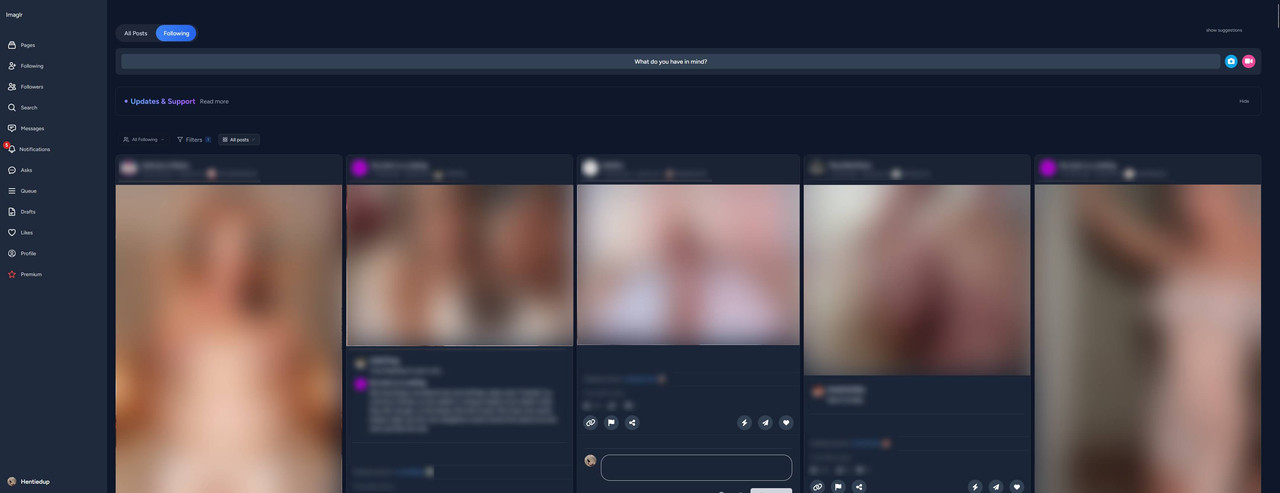
Makes the main post container on Imaglr full width, optionally displaying multiple posts per row. Also lets you adjust post size and home page display style. (Affects Home page and Profile pages)

Screenshot ^Example screenshot on an ultrawide monitor^

Also makes it so the little "Suggestions" box on the side, does not take up screen space when hidden. You can hide it from the small "hide" button on it, and show it again by clicking on "show suggestion" at the top of the page on the right. (see screenshot)


You need Stylus to be able to install userstyles.


Settings

Settings found in Stylus menu by clicking the cog icon next to the style.

  • Post Container Width: Sets the width of the main container that houses all the posts.
  • Single Post Width: Sets the desired post width.
    • Note that in Grid and Masonry view modes, posts will be enlarged to fill the remaining available space up to until there is enough space to fit a new post at desired width.
    • e.g. If there is 1200px of space, and you have Single Post Width set to 500px, it can't fit 3 in a row, so instead it will expand the 2 it can fit.
  • Home Page Mode: Lets you choose the view mode for the home page.