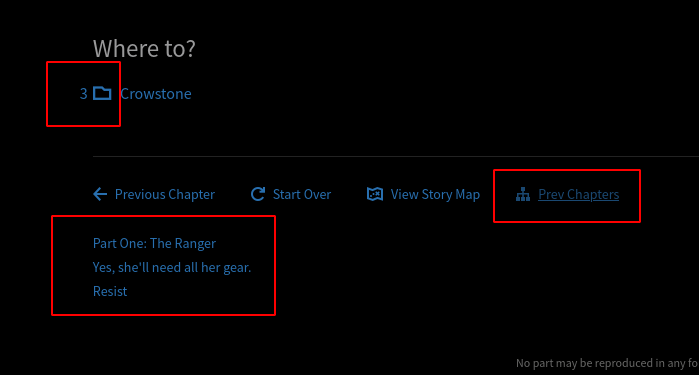
Chapter counter for Map and Next Chapter choice

Counts and displays how many chapters each branch has inside on the map screen and when choosing your next chapter

您需要先安装一个扩展,例如 篡改猴Greasemonkey暴力猴,之后才能安装此脚本。

You will need to install an extension such as Tampermonkey to install this script.

您需要先安装一个扩展,例如 篡改猴暴力猴,之后才能安装此脚本。

您需要先安装一个扩展,例如 篡改猴Userscripts ,之后才能安装此脚本。

您需要先安装一款用户脚本管理器扩展,例如 Tampermonkey,才能安装此脚本。

您需要先安装用户脚本管理器扩展后才能安装此脚本。

(我已经安装了用户脚本管理器,让我安装!)

您需要先安装一款用户样式管理器扩展,比如 Stylus,才能安装此样式。

您需要先安装一款用户样式管理器扩展,比如 Stylus,才能安装此样式。

您需要先安装一款用户样式管理器扩展,比如 Stylus,才能安装此样式。

您需要先安装一款用户样式管理器扩展后才能安装此样式。

您需要先安装一款用户样式管理器扩展后才能安装此样式。

您需要先安装一款用户样式管理器扩展后才能安装此样式。

(我已经安装了用户样式管理器,让我安装!)

作者
sllypper
日安装量
0
总安装量
75
评分
0 0 0
版本
3.0.2
创建于
2021-04-20
更新于
2024-01-16
大小
34.5 KB
许可证
暂无
适用于

Map page

  • Shows how many chapters are inside each chapter in the map screen
  • Button to toggle Collapse/Expand of all chapters of the chosen depth

Chapter page

  • Shows the date of chapters of scanned stories under the chapter's header
  • Shows how many chapters are inside each chapter choice
  • Button "Prev Chapters" that shows a tree of all chapters leading to the present one

How to use:

Open the map page, load the entire map moving to the bottom, then click regenerate. Now it should all work

Ver 3.0.0 alpha. Didn't polish, code is wack, but its usable