
Tervetuloa Sleazy Forkin, sivustolle aikusten userscriptejä varten.
Mitä ovat userscriptit?
Userscriptit antavat sinun hallita selauskokemustasi. Asennuksen jälkeen ne parantavat automaattisesti vierailemiasi sivustoja lisäämällä ominaisuuksia, tekemällä sivuista helppokäyttöisempiä tai poistamalla ärsyttäviä osia. Sleazy Forkin userscriptit ovat muiden käyttäjien kirjoittamia ja julkaisemia. Ne ovat ilmaisia asentaa ja helppoja käyttää.
Step 1: install a user script manager
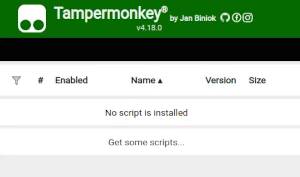
To use user scripts you need to first install a user script manager. Which user script manager you can use depends on which browser you use.
Työpöytä Mobile (Android) Mobile (iOS)
- Chrome: Tampermonkey or Violentmonkey
- Firefox: Greasemonkey, Tampermonkey, or Violentmonkey
- Safari: Tampermonkey or Userscripts
- Microsoft Edge: Tampermonkey or Violentmonkey
- Opera: Tampermonkey or Violentmonkey
- Maxthon: Violentmonkey
- AdGuard (no additional software required)
- Firefox: Greasemonkey, Tampermonkey, or Violentmonkey
- Microsoft Edge: Tampermonkey
- Maxthon: Violentmonkey
- Dolphin: Tampermonkey
- UC: Tampermonkey
- XBrowser (no additional software required)
- EinkBro (no additional software required)
- Safari: Tampermonkey or Userscripts
- Gear (no additional software required)
- Teak (no additional software required)
- EinkBro (no additional software required)
Vaihe 2: asenna käyttäjäskripti
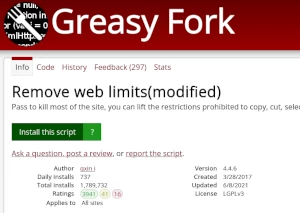
Browse this site to find a user script you want to try. Here is a sample of the most popular scripts:
- Missav -parantunut avustaja - Poista mainokset |
- Juuri 18 -vuotias - Koska olen juuri täyttänyt 18 vuotta, voin katsella aikuisten sisältöä
- Pornhub -videon lataa yhdellä napsautuksella - PornHub -video
- Missav Video Lataa työkalu - Nuuskaa videon todellinen latausosoite nykyiseltä Missav -toistosivulta ja lataa se
- NSFWDL – ilmainen videolataaja: PornHub, xHamster, XVideos, XNXX HD-MP4:ksi yhdellä klikkauksella - Ilmainen, ei rekisteröitymistä. Lataa videoita poistumatta sivulta: PornHub (myös Shorties), xHamster, XVideos, XNXX, RedGifs, Eporner, SpankBang, YouPorn, RedTube, Erome, ThisVid, TXXX ja 8 muuta sivustoa. Valitse todellinen laatu tiedostokoon kanssa, ja MP4 tallentuu suoraan latauksiin. Latauspainikkeet soittimessa ja pikkukuvissa, tallennus yhdellä klikkauksella suosikkilaadussa. Tietokone, Android ja iPhone. Ei ponnahdusikkunoita, ei uudelleenohjauksia.
Once you've found a user script, click the green install button on the user script's page, and your user script manager will ask you to confirm the install.
Step 3: use the user script
Go to the site the user script affects. It should automatically do its thing. After trying out the user script for a while, go back to where you installed the user script and leave some feedback for the user script's author.