
Welcome to Sleazy Fork, a site for adult user scripts.
What are user scripts?
User scripts put you in control of your browsing experience. Once installed, they automatically make the sites you visit better by adding features, making them easier to use, or taking out the annoying bits. The user scripts on Sleazy Fork were written by other users and posted to share with the world. They're free to install and easy to use.
Step 1: install a user script manager
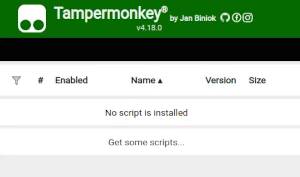
To use user scripts you need to first install a user script manager. Which user script manager you can use depends on which browser you use.
Desktop Mobile (Android) Mobile (iOS)
- Chrome: Tampermonkey or Violentmonkey
- Firefox: Greasemonkey, Tampermonkey, or Violentmonkey
- Safari: Tampermonkey or Userscripts
- Microsoft Edge: Tampermonkey or Violentmonkey
- Opera: Tampermonkey or Violentmonkey
- Maxthon: Violentmonkey
- AdGuard (no additional software required)
- Firefox: Greasemonkey, Tampermonkey, or Violentmonkey
- Microsoft Edge: Tampermonkey
- Maxthon: Violentmonkey
- Dolphin: Tampermonkey
- UC: Tampermonkey
- XBrowser (no additional software required)
- EinkBro (no additional software required)
- Safari: Tampermonkey or Userscripts
- Gear (no additional software required)
- Teak (no additional software required)
- EinkBro (no additional software required)
Step 2: install a user script
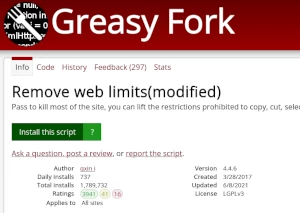
Browse this site to find a user script you want to try. Here is a sample of the most popular scripts:
- JAVBUS影片预告 - JAVBUS自动显示预告片
- 18 taong gulang lang - Dahil nag -18 na lang ako, makakapanood ako ng nilalaman ng may sapat na gulang
- 海角社区金币贴、钻石贴免费看 - 海角金币贴、钻石贴免费看
- VK Video Blur Remover + Login Bypass - Removes blur, cleans up overlays, bypasses login popups, and restores scroll on VK/VKVideo
- GayTorrent - Auto-Expand Gallery Pics - Awtomatikong pinapalaki ang mga thumbnail ng gallery sa seksyong Mga Larawan sa buong sukat nang hindi nagki-click.
Once you've found a user script, click the green install button on the user script's page, and your user script manager will ask you to confirm the install.
Step 3: use the user script
Go to the site the user script affects. It should automatically do its thing. After trying out the user script for a while, go back to where you installed the user script and leave some feedback for the user script's author.