☰

Danbooru Enhanced Gallery

Overhauls Danbooru's default gallery view with a sleek, responsive justified grid layout. Includes high-res thumbnails, hover previews, infinite scroll, and more.

Dovrai installare un'estensione come Tampermonkey, Greasemonkey o Violentmonkey per installare questo script.

You will need to install an extension such as Tampermonkey or Violentmonkey to install this script.

Dovrai installare un'estensione come Tampermonkey o Violentmonkey per installare questo script.

Dovrai installare un'estensione come Tampermonkey o Userscripts per installare questo script.

Dovrai installare un'estensione come ad esempio Tampermonkey per installare questo script.

Dovrai installare un gestore di script utente per installare questo script.

(Ho già un gestore di script utente, lasciamelo installare!)

Dovrai installare un'estensione come ad esempio Stylus per installare questo stile.

Dovrai installare un'estensione come ad esempio Stylus per installare questo stile.

Dovrai installare un'estensione come ad esempio Stylus per installare questo stile.

Dovrai installare un'estensione per la gestione degli stili utente per installare questo stile.

Dovrai installare un'estensione per la gestione degli stili utente per installare questo stile.

Dovrai installare un'estensione per la gestione degli stili utente per installare questo stile.

(Ho già un gestore di stile utente, lasciamelo installare!)

Autore
orx ibx
Installazioni giornaliere
2
Installazioni totali
51
Valutazione
0 0 0
Versione
1.60
Creato il
20/07/2025
Aggiornato il
22/10/2026
Dimensione
87,6 KB
Licenza
MIT (https://opensource.org/licenses/MIT)
Applica a

I hated Danbooru's shitty outdated galllery so I vibecoded this userscript to fix it.

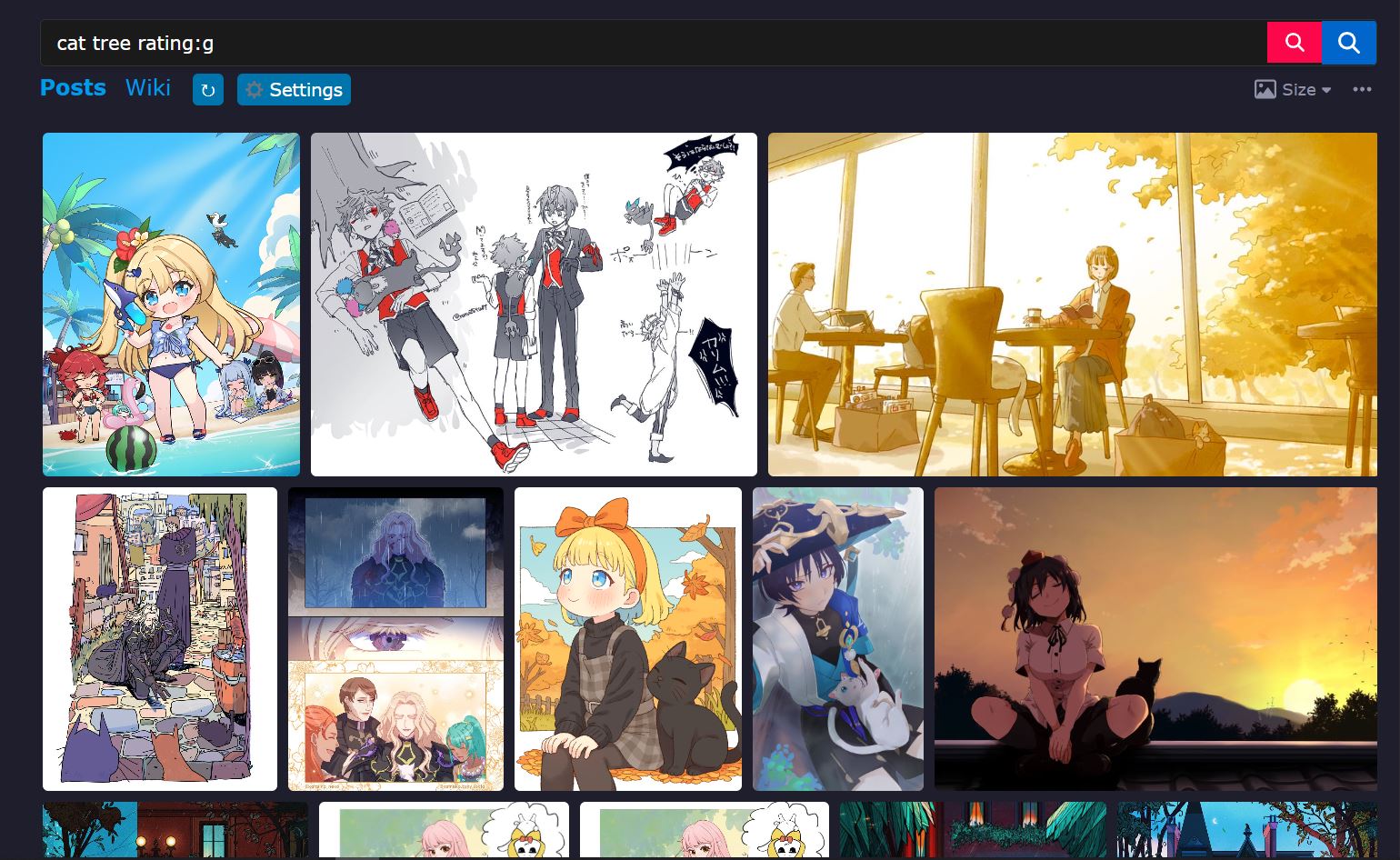
It changes the gallery's layout into a justified grid, along with other features such as Infinite Scroll, in-page search, etc.

Screenshots

Justified gallery

Justified gallery

Hover preview

Hover preview

Caption overlay & post info tooltip

Caption overlay and info tooltip

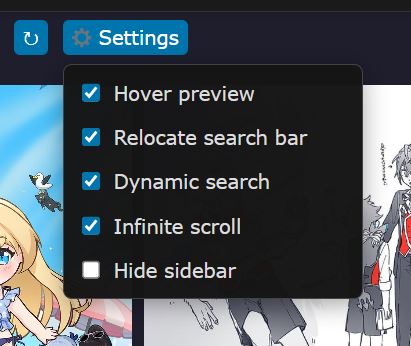
Settings dropdown

Settings dropdown


Danbooru Enhanced Gallery

A cleaner, faster, endlessly scrolling Danbooru gallery.

Danbooru Enhanced Gallery replaces Danbooru's default thumbnail grid with a sleek justified layout (think Google Photos / Flickr), then layers on the quality-of-life features you'd actually want: sharper thumbnails, hover previews, in-place search, infinite scroll, and one-click upvote / favorite — all from a single, toggleable settings menu.

Browse more posts, with less clicking, and no page reloads.


✨ Features

🧱 Layout

  • Justified grid gallery — posts are laid out in tidy rows of equal height that fill the full width of the page, so there is no wasted space and no cropped thumbnails. The final row is left un-stretched so a few leftover posts never get blown up.
  • Responsive — the layout rebuilds automatically when you resize the window or change browser zoom.
  • Optional layout tweaks — hide the sidebar for more room, and move the search bar to the top of the content area in a compact, styled bar.

🔍 Images

  • Automatic high-res thumbnails — thumbnails are upgraded to a larger version as they approach the screen, loaded in small batches so scrolling stays smooth. Images swap in without shifting the layout, and loading pauses while you scroll. These are Danbooru's downscaled sample images, not the full-size originals (see the notes below).
  • Hover preview — rest your cursor on a thumbnail to see a large preview that follows the mouse. It is sized to your screen and stays crisp on HiDPI displays and at any zoom level.

⚡ Interaction

  • Quick upvote & favorite — vote or favorite straight from the thumbnail overlay. Click again to undo. The score updates instantly.
  • Post info tooltip — click the 🛈 button for a popup with the post's tags (grouped by category and colored as on Danbooru), plus its information and options. Close it by clicking elsewhere, pressing Esc, or hitting ×.
  • At-a-glance details — each thumbnail shows its score, and video / animation posts show their duration.

🔎 Search & Navigation

  • Dynamic search — a red search button runs your search in place: the results, page title, URL and pagination update without a full page load. Pressing Enter in the search box does the same (unless you've highlighted an autocomplete suggestion).
  • Seamless infinite scroll — the next page loads automatically as you near the bottom. Duplicate posts are skipped, failed loads are retried, and each page waits for the gallery to finish laying out the previous one so nothing jumps around.

🎛️ Customization

  • Settings dropdown — a ⚙ Settings button added to the page lets you switch features on or off instantly. Your choices are remembered.
  • Reload button (↻) — re-runs the gallery layout on demand.

⚙️ Configuration, Usage & Notes

💡 Important notes

🔍 Tip: zoom in for bigger posts

For larger, easier-to-view posts, set your browser zoom to 150% or higher. Hold Ctrl (Cmd on Mac) and scroll the mouse wheel up, or press Ctrl + + to zoom in and Ctrl + - to zoom out. Ctrl + 0 resets to 100%. The gallery re-lays itself out automatically whenever you change the zoom.

ℹ️ About "high-res" thumbnails

The "high-res" thumbnails this script loads are not the full-resolution original images. They are Danbooru's downscaled sample images: much sharper than the tiny default thumbnails, but a fraction of the size of an original. This is intentional. Loading full-size originals for every post would use a huge amount of bandwidth and make scrolling slow and laggy, so samples give you the best balance of quality and speed. The hover preview uses the same sample versions, and posts that are already small (and have no separate sample) simply use their original file. To see the full original, open the post page.

Using the settings menu

Look for the ⚙ Settings button next to the ↻ button in the row of tabs above the gallery (the "Posts" row). Click it and tick or untick any option — changes apply immediately and are saved in your browser.

Option What it does
Hover preview Large preview when hovering a thumbnail
Relocate search bar Moves the search bar to the top of the content area in a compact bar
Dynamic search Red search button + Enter search without reloading the page
Infinite scroll Loads the next page automatically as you scroll
Hide sidebar Hides Danbooru's sidebar to give the gallery more room

Basic usage

  • Preview a post: hover over a thumbnail.
  • Vote / favorite: use the 🡅 and ❤︎ buttons in the thumbnail's bottom bar (you must be logged in to Danbooru).
  • See tags and details: click 🛈 on a thumbnail.
  • Search without reloading: type your tags and click the red search button (or press Enter).
  • Gallery looks off? Click ↻ to rebuild the layout.

Customizing the script header

Everything above can also be changed at the top of the script, in the CONFIG object (open the script in your userscript manager's editor):

Option Default Description
enableHoverPreview true Show the hover preview
enableHighRes true Upgrade thumbnails to high-res versions
enableRelocateSearchBar true Move the search bar above the gallery
enableHiddenSidebar true Hide the sidebar
enableDynamicSearch true Enable in-place search
enableInfiniteScroll true Enable infinite scroll
hoverDelay 300 Milliseconds before the hover preview appears
infiniteScrollThreshold 400 Pixels from the bottom at which the next page starts loading
infiniteScrollThrottle 200 Milliseconds between scroll-position checks
viewportBuffer 600 Pixels below the screen at which high-res loading begins
batchSize 5 How many high-res thumbnails load at once
batchDelay 0 Milliseconds between high-res batches
enableScrollPause true Pause high-res loading while scrolling
scrollThrottleDelay 0 Milliseconds to wait after scrolling stops before loading resumes
maxRetries 0 Retries for failed post-info requests

The row look is set in JG_CONFIG just below it — for example rowHeight (default 240) for taller or shorter rows, and margins (default 8) for the gap between thumbnails.

Good to know: the five on/off toggles in the Settings menu are saved in your browser (localStorage, key zdjg_settings) and take priority over the defaults in the script. If you change a default in CONFIG and nothing happens, flip it in the menu instead, or delete that key to start fresh. Also note that script updates will overwrite your header edits unless you turn off auto-update for this script.

Requirements & compatibility

  • A userscript manager such as Tampermonkey or Violentmonkey.
  • Runs on danbooru.donmai.us gallery pages (home, /posts, and tag searches).
  • Upvoting and favoriting require you to be logged in.
  • Works alongside other userscripts that sort or filter posts — the gallery rebuilds when you use their sort / filter buttons.

Known limitations

  • The upvote / favorite buttons don't show whether a post is already upvoted or favorited when the page loads.
  • Dynamic search updates the results, title, URL and pagination, but not other page elements such as the sidebar's related tags.
  • Infinite scroll keeps the paginator and address bar on the first page you loaded.
  • Danbooru's blacklist isn't applied by this script; it doesn't add any filtering of its own.
  • Using the browser's back / forward buttons after a dynamic search reloads the page to restore the matching results.

Credits

Built with jQuery and Justified Gallery by Miro Mannino (MIT license).


Not affiliated with Danbooru. Feedback and bug reports are welcome in the Greasy Fork feedback section.