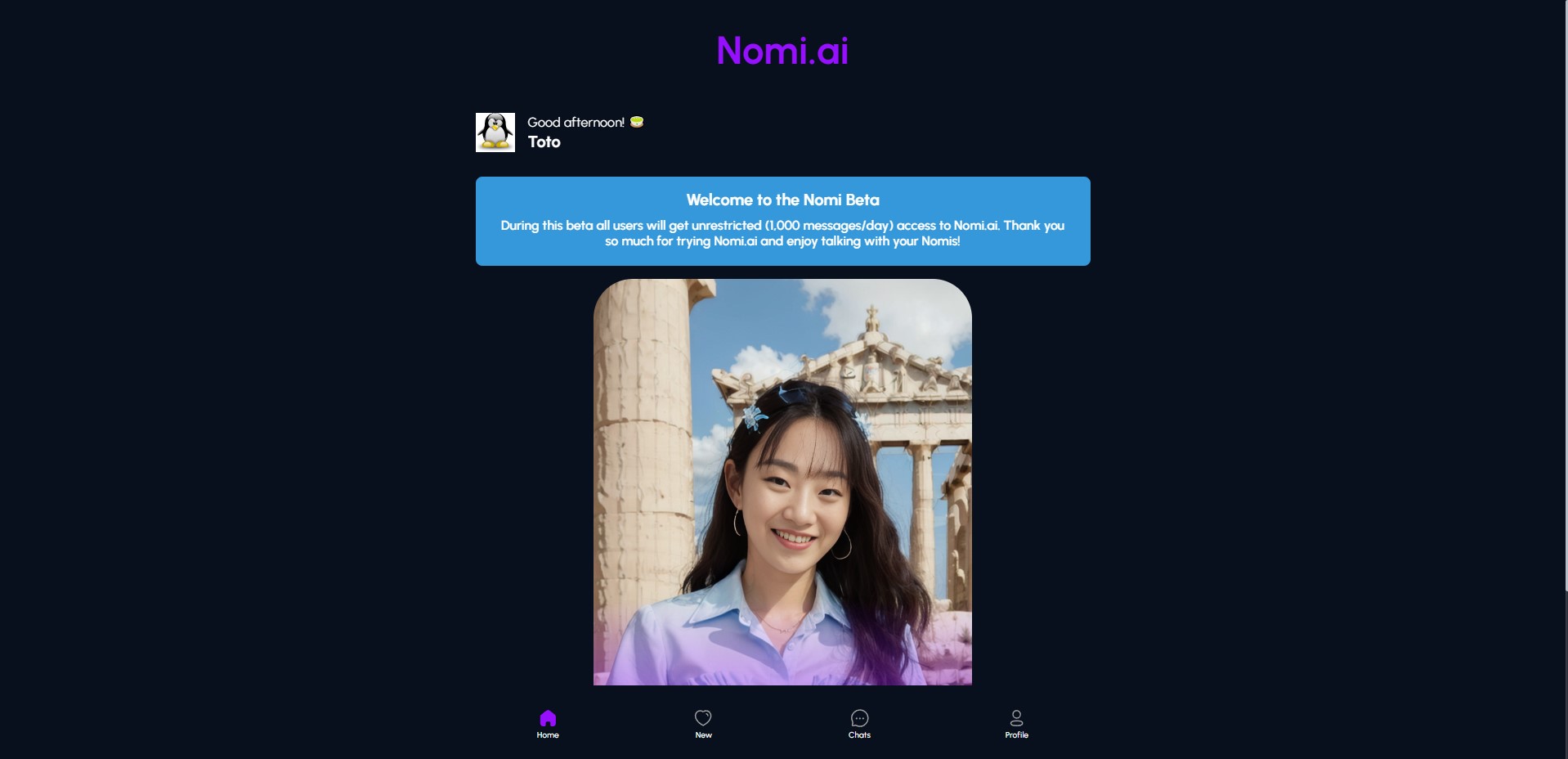
Nomi Dark Theme

Dark theme for Nomi.

Você precisará instalar uma extensão como Tampermonkey, Greasemonkey ou Violentmonkey para instalar este script.

You will need to install an extension such as Tampermonkey to install this script.

Você precisará instalar uma extensão como Tampermonkey ou Violentmonkey para instalar este script.

Você precisará instalar uma extensão como Tampermonkey ou Userscripts para instalar este script.

Você precisará instalar uma extensão como o Tampermonkey para instalar este script.

Você precisará instalar um gerenciador de scripts de usuário para instalar este script.

(Eu já tenho um gerenciador de scripts de usuário, me deixe instalá-lo!)

Você precisará instalar uma extensão como o Stylus para instalar este estilo.

Você precisará instalar uma extensão como o Stylus para instalar este estilo.

Você precisará instalar uma extensão como o Stylus para instalar este estilo.

Você precisará instalar um gerenciador de estilos de usuário para instalar este estilo.

Você precisará instalar um gerenciador de estilos de usuário para instalar este estilo.

Você precisará instalar um gerenciador de estilos de usuário para instalar este estilo.

(Eu já possuo um gerenciador de estilos de usuário, me deixar fazer a instalação!)

Autor
BreatFR
Instalações hoje
0
Total de instalações
2
Avaliações
0 0 0
Versão
1.35.0
Criado
05/02/2024
Atualizado
02/06/2024
Tamanho
17 KB
Licença
AGPL-3.0-or-later
Aplicável a

PayPal

Stylus dark theme for whole Nomi website.

Preview

Preview Don't take care of this chat, i create it only to make the screenshot :)

More previews here:

Changelog

Some modifications other than the dark theme include in my theme:

  • on whole nomi site

    • thin scrollbars
  • now in chat page:

    • bigger text in chat bubbles
    • fix some forgotten ui elements in the ui base to follow the nomi's based design
    • remove the nomi logo on top left and remove some free space to enlarge the chat size to max without modify the size left side of the page
    • remove borders under the logo already removed and between nomi's names if more than 1 nomi
    • add heart background in chat
    • modification of bubbles colors
    • pics in chat are in row if more than 2 (depending of the screen size, so on mobile like me on last screenshot, 4 pics aren't in row on my iphone 12 mini)
    • pics in chat, photo album and photo viewer zoom when they are hover
    • for large screens (+1500px wide):
      • new home page where you can see all your nomis after logged in
      • new chat page design to get full size profile picture, sticky top bar

How to use in few steps on computer

  1. Install Stylus browser extension
  2. Chromium based browsers link: https://chrome.google.com/webstore/detail/stylus/clngdbkpkpeebahjckkjfobafhncgmne
  3. Firefox based browsers link: https://addons.mozilla.org/firefox/addon/styl-us/

Chromium based browsers non-exhaustive list:

  • Brave
  • Chromium
  • Google Chrome
  • Iridium Browser
  • Microsoft Edge
  • Opera
  • Opera GX
  • SRWare Iron
  • Ungoogled Chromium
  • Vivaldi
  • Yandex Browser
  • many more

Firefox based browsers non-exhaustive list:

  • Mozilla Firefox
  • Mullvad Browser
  • Tor Browser
  • Waterfox
  • many more
  1. Go on UserStyles.world website and click on Install under the preview picture or on my GitLab and select ALL the code to finally copy it.

  2. To update the theme, open the Stylus Management window and click on Check for update and follow the instructions or just wait 24h to automatic update

  3. Enjoy :)

How to use in few steps on iOS (Safari)

  1. Install Makeover - Custom CSS app

  2. Open the app just installed and click on How to Use and follow instructions

  3. In Safari come on UserStyles.world or on my GitLab and select ALL the code to finally copy it

  4. In Safari go to nomiAI website and click on plugin icon to finally click on Makeover

  5. Paste the previously copied code in the Makerover's field and remove the 1st line:

    @-moz-document url-prefix("https://beta.nomi.ai/nomis/") {
    

    if you don't delete this line, the style won't work.

for each update you'll need copy/paste the code and remove this line.

  1. Enjoy :)

How to use in few steps on Android (Kiwi Browser)

  1. Install Kiwi Browser

  2. Come on UserStyles.world page and install the style like on computer

  3. Go on nomiAI website and click on 3 dots on top right of the browser and activate Dark mode

  4. To update the theme do like on computer.

  5. Enjoy :)

    PayPal