wnacg Optimization

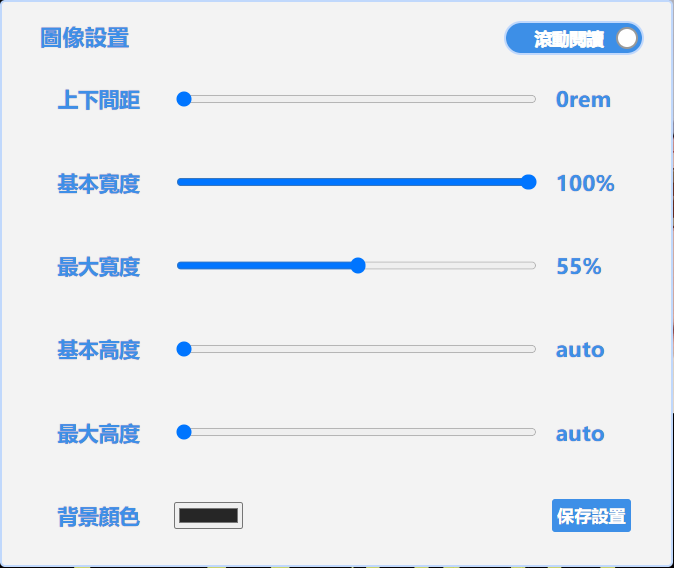
The desktop version supports switching between automatic page turning and manual key press page turning, with customizable background color and image size. The mobile version opened on a desktop (not applicable on mobile devices) allows for customizing the background color and image size.

You will need to install an extension such as Tampermonkey, Greasemonkey or Violentmonkey to install this script.

You will need to install an extension such as Tampermonkey to install this script.

You will need to install an extension such as Tampermonkey or Violentmonkey to install this script.

You will need to install an extension such as Tampermonkey or Userscripts to install this script.

You will need to install an extension such as Tampermonkey to install this script.

You will need to install a user script manager extension to install this script.
(I already have a user script manager, let me install it!)

You will need to install an extension such as Stylus to install this style.

You will need to install an extension such as Stylus to install this style.

You will need to install an extension such as Stylus to install this style.

You will need to install a user style manager extension to install this style.

You will need to install a user style manager extension to install this style.

You will need to install a user style manager extension to install this style.

(I already have a user style manager, let me install it!)

Author
Canaan HS
Daily installs
0
Total installs
712
Ratings
2 0 0
Version
0.0.15
Created
2023-08-08
Updated
2024-11-25
Size
25.6 KB
License
MIT
Applies to

# **Optimize Wnacg Website User Experience**

---

## **👻 How to Use**

1. Install a browser script manager (such as [Tampermonkey](https://chrome.google.com/webstore/detail/tampermonkey/dhdgffkkebhmkfjojejmpbldmpobfkfo))
2. [Install the script](https://update.greasyfork.org/scripts/472726/wnacg%20%E5%84%AA%E5%8C%96.user.js)
3. Visit [wnacg](https://www.wnacg.com/)

---

## **👀 Feature Demo**

- **Version 0.0.11 Demo**: [YouTube](https://www.youtube.com/watch?v=UaJ2rz7QVKM)

## **📜 Feature Overview**
- Hide top ads
- Hide navigation bar, which will appear when the mouse hovers over it
- Settings menu to adjust image size, spacing, and background color

### **Reading Mode**
- Scroll reading: Automatically flip pages when entering, allowing you to read by scrolling (it is recommended to disable other auto-flip scripts)
- Page flip reading: Use left/right arrow keys or numbers 4|5 to flip pages

### **Language Adaptation**
- The menu style is primarily adjusted for Chinese, other languages may have layout issues
- **🌐 Supported Languages**: The following languages will be automatically adapted based on browser settings:
- Traditional Chinese
- Simplified Chinese
- Japanese
- English

### **Settings Menu**
- Shift: Open settings menu
- Esc: Close settings menu
- You can also toggle from the script manager by clicking once to open and once more to close

---

## 📣 Problem Feedback

> First of all, these scripts were originally written for my personal use and later simply shared with those who need them.
>
> As a developer providing scripts for free, I do not charge any fees and have no obligation to provide support for all situations, so I kindly ask you to maintain basic respect and friendliness when providing feedback.

#### ❓ Before submitting an issue, please note the following points:

**Not sure if it's a bug or a configuration issue?** Please use an "inquiry" approach to describe your situation, rather than directly determining that the script has an error.

#### 🔍 Description reference:

- **🖥️ Execution environment**: Browser, script manager (Tampermonkey, etc.), system platform
- **🧭 Operation process**: Detailed step-by-step explanation, not just a brief description
- **🎯 Expected result**: What effect you hoped to achieve and what actually happened
- **🤖 Suggestions (optional)**: If convenient, please try having an AI help understand your issue and attach the results

#### ⚠️ Important reminder:

**This is a free script, not a commercial product**

If your feedback lacks details, is emotional, non-constructive, or is just a simple sentence, I will not be able to or spend time guessing your meaning. Such feedback only consumes development enthusiasm and time.

#### 💡 Please understand:

**Developing, testing, and maintaining scripts requires a lot of effort**. Careless negative reviews can frustrate developers and even lead them to stop maintenance. Please cherish these free resources and report issues in a specific and rational manner.

**If you are unwilling to help clarify the issue and just want to vent and leave**, I suggest you choose not to use this script. Don't waste each other's time.

**If unclear and non-constructive comments appear in the future, I will choose to ignore them and may ultimately abandon script maintenance. Thank you for your understanding and cooperation.**

---

## **🔗 Related Links**

- **Development Environment**: [Greasy Fork](https://greasyfork.org/zh-TW/users/989635-canaan-hs)
- **GitHub Repository**: [GitHub](https://github.com/Canaan-HS/MonkeyScript/tree/main/WnacgOptimization)

---

## **📦 Version Information**

**Release Version: 0.0.15**

### **Update Contents**
1. Fixed style adjustments

---