This is a video downloader for theswag.live website.
這是一個 swag.live 網站的視頻下載器, 請注意本腳本只能下載你在 swag 上已經購買的視頻,詳情查看: swag.live archive
演示視頻地址: 點擊我查看在線演示
在下載完成並安裝之後,如果你是mac的包版本系統 (> Big sur) 則會提示你如下信息:
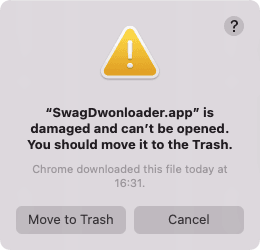
這是因為該項目為學習項目, 所以並沒有簽署相關蘋果秘鑰,解決這個問題也很簡單,你只需要執行如下指令
xattr -d com.apple.quarantine /Applications/SwagDwonloader.app
在下載完成之後,你可以點擊 setup.exe 進行安裝,同樣的你可能會遇到類似以下截圖的內容
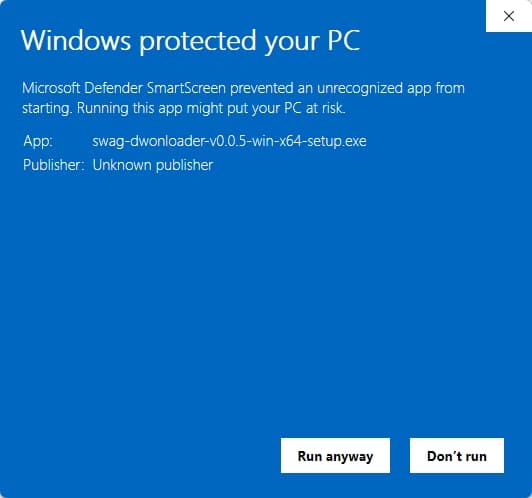
這是因為該項目為學習項目, 所以並沒有簽署相關證書, 所以你必須點擊 Run anyway 才可以執行。
你可以選擇兩種方式登錄你的 swag.live 帳號, 並用來獲取你已經購買的視頻
如果你信任本項目,你可以點擊 Activate Your Account 按鈕並且使用帳號或者密碼進行登錄
如果你比較擔心,那麼你可以使用源站的 token 進行激活, 詳細步驟如下:
step-1. 請使用 Chome, Firefox, Edge 等瀏覽器前往 swag.live login 並登錄
step-2. 當你登錄成功之後,請使用F12打開你的瀏覽器調試工具並選擇 console 選項
step-3. 你可以使用如下代碼嘗試提取你的Token
var db
var request = indexedDB.open('localforage', 3)
request.onsuccess = function () {
  db = request.result
  var tx = db.transaction('keyvaluepairs', 'readonly')
  var store = tx.objectStore('keyvaluepairs')
  var _request = store.getAll('_refreshToken')
  _request.onsuccess = function () {
    var token = _request.result.toString()
    console.log(token)
  }
}
或者
var db
var request = indexedDB.open('localforage', 2)
request.onsuccess = function () {
  db = request.result
  var tx = db.transaction('keyvaluepairs', 'readonly')
  var store = tx.objectStore('keyvaluepairs')
  var _request = store.getAll('_refreshToken')
  _request.onsuccess = function () {
    var token = _request.result.toString()
    console.log(token)
  }
}
step-4. 將 _refreshToken 粘貼到 Use Token 輸入框中點擊 Activate 按鈕激活你的帳號
