Overhauls Danbooru's default gallery view with a sleek, responsive justified grid layout. Includes high-res thumbnails, hover previews, infinite scroll, and more.
I hated Danbooru's shitty outdated galllery so I vibecoded this userscript to fix it.
It changes the gallery's layout into a justified grid, along with other features such as Infinite Scroll, in-page search, etc.
Justified gallery
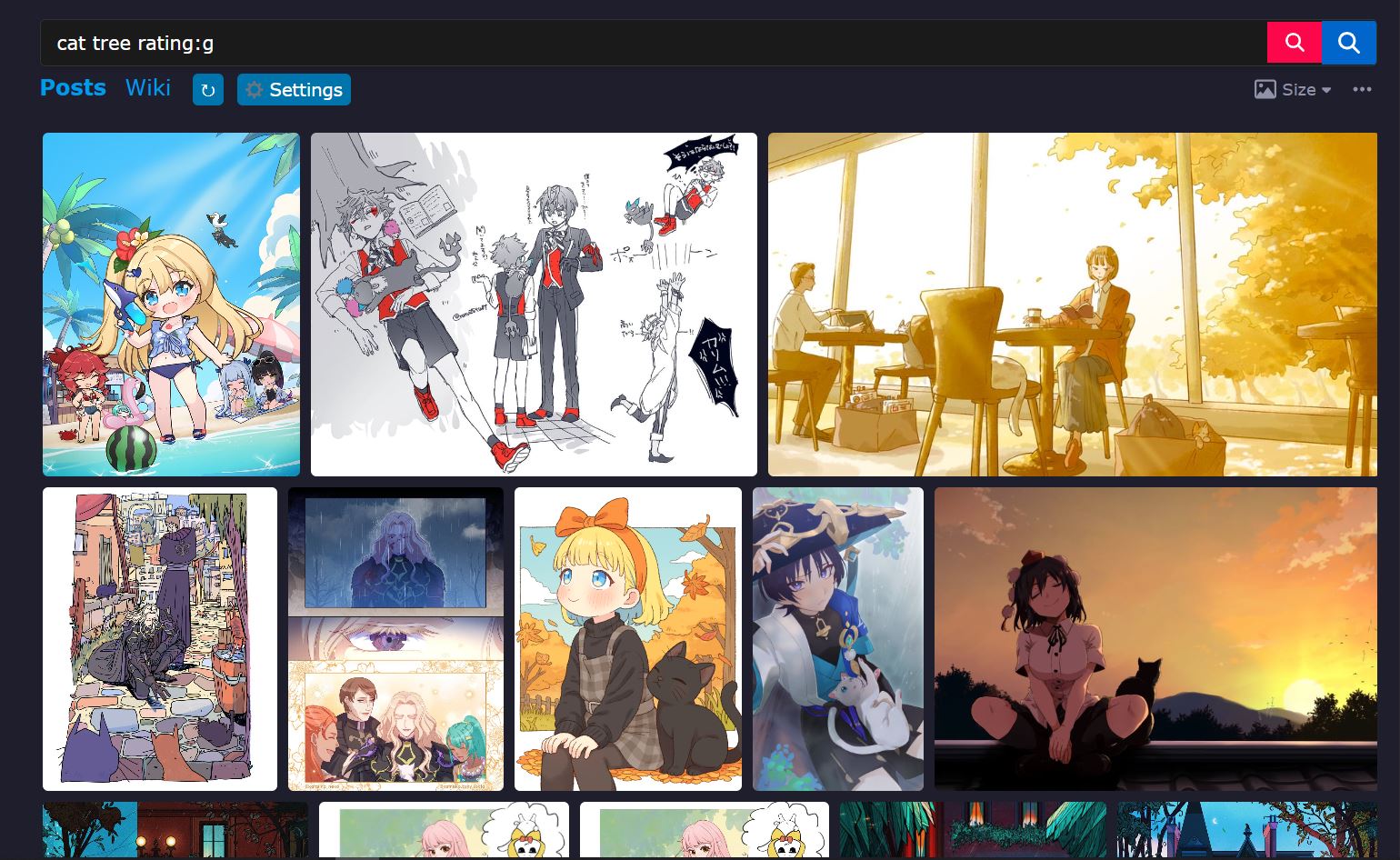
Hover preview

Caption overlay & post info tooltip

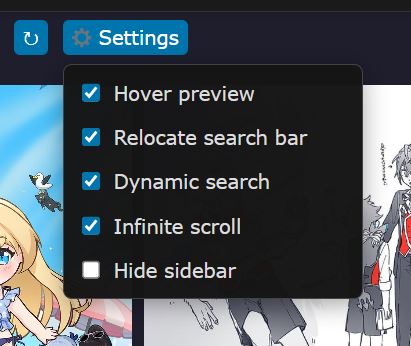
Settings dropdown
A cleaner, faster, endlessly scrolling Danbooru gallery.
Danbooru Enhanced Gallery replaces Danbooru's default thumbnail grid with a sleek justified layout (think Google Photos / Flickr), then layers on the quality-of-life features you'd actually want: sharper thumbnails, hover previews, in-place search, infinite scroll, and one-click upvote / favorite — all from a single, toggleable settings menu.
Browse more posts, with less clicking, and no page reloads.
🔍 Tip: zoom in for bigger posts
For larger, easier-to-view posts, set your browser zoom to 150% or higher. Hold Ctrl (Cmd on Mac) and scroll the mouse wheel up, or press Ctrl + + to zoom in and Ctrl + - to zoom out. Ctrl + 0 resets to 100%. The gallery re-lays itself out automatically whenever you change the zoom.
ℹ️ About "high-res" thumbnails
The "high-res" thumbnails this script loads are not the full-resolution original images. They are Danbooru's downscaled sample images: much sharper than the tiny default thumbnails, but a fraction of the size of an original. This is intentional. Loading full-size originals for every post would use a huge amount of bandwidth and make scrolling slow and laggy, so samples give you the best balance of quality and speed. The hover preview uses the same sample versions, and posts that are already small (and have no separate sample) simply use their original file. To see the full original, open the post page.
Look for the ⚙ Settings button next to the ↻ button in the row of tabs above the gallery (the "Posts" row). Click it and tick or untick any option — changes apply immediately and are saved in your browser.
| Option | What it does |
|---|---|
| Hover preview | Large preview when hovering a thumbnail |
| Relocate search bar | Moves the search bar to the top of the content area in a compact bar |
| Dynamic search | Red search button + Enter search without reloading the page |
| Infinite scroll | Loads the next page automatically as you scroll |
| Hide sidebar | Hides Danbooru's sidebar to give the gallery more room |
Everything above can also be changed at the top of the script, in the CONFIG object (open the script in your userscript manager's editor):
| Option | Default | Description |
|---|---|---|
enableHoverPreview |
true |
Show the hover preview |
enableHighRes |
true |
Upgrade thumbnails to high-res versions |
enableRelocateSearchBar |
true |
Move the search bar above the gallery |
enableHiddenSidebar |
true |
Hide the sidebar |
enableDynamicSearch |
true |
Enable in-place search |
enableInfiniteScroll |
true |
Enable infinite scroll |
hoverDelay |
300 |
Milliseconds before the hover preview appears |
infiniteScrollThreshold |
400 |
Pixels from the bottom at which the next page starts loading |
infiniteScrollThrottle |
200 |
Milliseconds between scroll-position checks |
viewportBuffer |
600 |
Pixels below the screen at which high-res loading begins |
batchSize |
5 |
How many high-res thumbnails load at once |
batchDelay |
0 |
Milliseconds between high-res batches |
enableScrollPause |
true |
Pause high-res loading while scrolling |
scrollThrottleDelay |
0 |
Milliseconds to wait after scrolling stops before loading resumes |
maxRetries |
0 |
Retries for failed post-info requests |
The row look is set in JG_CONFIG just below it — for example rowHeight (default 240) for taller or shorter rows, and margins (default 8) for the gap between thumbnails.
Good to know: the five on/off toggles in the Settings menu are saved in your browser (
localStorage, keyzdjg_settings) and take priority over the defaults in the script. If you change a default inCONFIGand nothing happens, flip it in the menu instead, or delete that key to start fresh. Also note that script updates will overwrite your header edits unless you turn off auto-update for this script.
danbooru.donmai.us gallery pages (home, /posts, and tag searches).Built with jQuery and Justified Gallery by Miro Mannino (MIT license).
Not affiliated with Danbooru. Feedback and bug reports are welcome in the Greasy Fork feedback section.
